It Started With A Simple Frustration
In Sri Lankan cities, that small weekly uncertainty compounds into a national problem. Residents wait with bags at the gate or miss the truck entirely; bags left out get torn open by dogs and crows. The 2017 Meethotamulla dump collapse made waste management a national issue — yet households still have no digital way to know when the truck is coming, what to separate, or how to report a missed pickup.
The System, Not The Interface
Mapping the current state exposed a service running blind: fixed municipal rounds nobody can track, schedules that vary by ward, near-zero source segregation, and an invisible informal recycling economy of bottle, paper, and metal buyers with no digital layer connecting them to supply.
Observe, Interview, Validate, Synthesize
Stakeholder Ecosystem
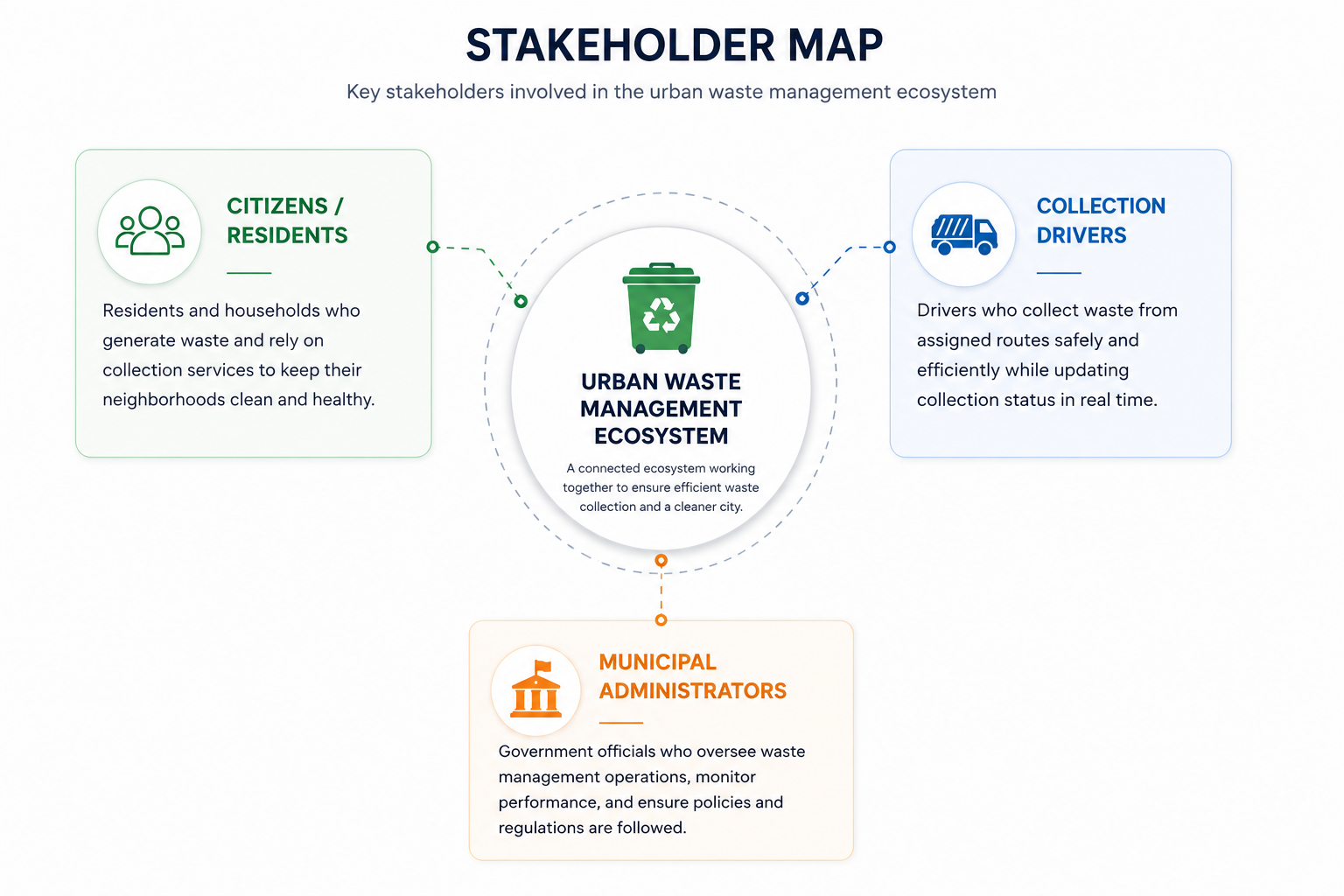
Waste collection touches four very different groups — residents, drivers, council supervisors, and informal collectors. I needed to see who depends on whom before designing anything.
The council sits at the centre of every flow but has the least visibility — supervisors run 12 trucks with a phone and paper logs.
It set the interview plan: one track per stakeholder group, with the council dashboard promoted to a first-class product.
- Mapped actor relationships from notes
- Suggested overlooked stakeholders
- Structured the ecosystem diagram
- Field observation & system mapping
- Prioritised the council as key node
- Drew and verified the final map
Proto Personas → Final Personas
Meet The People Behind The Product
Three research-grounded personas — one per Phase 1 user group — anchored every scoping decision. Each surfaced a version of the same hidden problem: collection that is inconsistent, unrecorded, and sometimes conditional on an informal payment.

Nadeeka Perera
I have to leave the garbage out just in case — and half the time I still miss the truck.
About
Nadeeka manages her household waste before commuting to work. She has missed collection repeatedly because the truck came earlier or later than expected, and suspects some stops are only served when a small tip is paid.
Demographics & Context
- Moderate tech literacy — not expert
- Smartphone, WhatsApp and basic apps daily
- Sinhala primary, some English
- Away at work during collection hours
Pain Points
- Never knows exactly when the truck will arrive
- Has missed collection while at work
- Bulk items require a slow call to the council office
- No one to report illegal dumping near her property
- Past complaints had no tracking or resolution
- Suspects collectors skip her stop unless a tip is paid — and fears reporting it will affect future collections
Goals
- Know in real time when the truck is near
- Get bulk waste collected without a phone call
- Flag problems and see action being taken
- Feel the local authority is accountable, not a black box
- Trust that collection happens because it is the job — not because she paid
Needs From The App
- Live truck tracking and ETA for her area
- Clear, area-specific collection schedule
- Special-collection request with status updates
- Issue reporting with photo and location
- Notifications for delays and route changes
Technology Use
Motivations
- Stop wasting time waiting or missing pickups
- Be treated fairly without paying extra
- Keep her neighbourhood clean
Sunil Bandara
Residents say I never came. Access was blocked — but there was never any way to record that.
About
Sunil drives and leads a collection crew across multiple GNDs. The work is physically demanding shift work with no formal waste-management training, and his base pay is low relative to the load — the pressure that creates informal-payment temptation across the sector.
Demographics & Context
- Limited experience with structured apps
- Basic to mid-range smartphone
- Sinhala / Tamil primary, minimal English
- Accountable for a full daily route
Pain Points
- No structured way to see special requests versus the normal route
- Blamed for missed stops when access was blocked or timing shifted
- No efficient way to tell residents about delays or breakdowns
- Special requests arrive by word-of-mouth with unclear details
- Manual paper or verbal reporting at end of shift
- Low base pay creates pressure around informal payments — and honest crews inherit the reputation problem
Goals
- Follow a clear, up-to-date route without confusion
- Handle special requests inside the normal workflow
- Communicate proactively to reduce complaints
- Have an official record when a collection is missed
- Be fairly rewarded through legitimate incentives
Needs From The App
- Route view with sequenced, flagged stops
- Broadcast tool for ETA, delay and cancellation
- Quick mark-as-missed with reason codes
- Low-literacy-friendly UI — large targets, minimal typing
- Works on modest devices and connectivity
Technology Use
Motivations
- Protection from unfair blame
- Recognition for complete, on-time service
- Fair reward for physically hard work
Chandima Wickramasinghe
When service fails I answer to leadership and the public — usually without good data to explain why.
About
Chandima coordinates between residents and collection crews across several routes, mostly by phone and informal channels. She works with limited staff, vehicles and budget, and has no central visibility into what is actually happening in the field.
Demographics & Context
- Moderate to good tech literacy
- Comfortable with spreadsheets and reporting
- Sinhala / Tamil primary, working English
- Answers to political leadership and the public
Pain Points
- Coordinates by phone with no central visibility
- Cannot see missed collections or open complaints in real time
- Special requests arrive through multiple informal channels
- Reported issues pile up with no resolution workflow
- Limited staff, vehicles and budget to allocate
- No reliable way to detect selective collection — it surfaces as vague complaints, not identifiable patterns
Goals
- One clear view across all routes, crews and requests
- Assign and track special requests efficiently
- Resolve reported issues with a visible trail
- Reduce complaints by improving communication
- Demonstrate accountability with real activity data
- Build a fair performance system that surfaces problem patterns
Needs From The App
- Dashboard of routes, requests, issues and missed collections
- Assign special requests to specific collectors
- Review and action resident reports
- Visibility into broadcasts and missed-collection reasons
- Status tracking connecting disposer to collector
Technology Use
Motivations
- Move from firefighting to proactive coordination
- Defend the service with evidence
- Fair, transparent crew performance
Assumption-based proto personas made team beliefs explicit and testable before field research across the three Phase 1 user groups.
All three roles described the same hidden problem from different angles — collection that is inconsistent, unrecorded, and sometimes conditional on an informal payment.
It reframed the product: alongside tracking and scheduling, the app needed a trust layer — safe reporting, missed-collection reason codes, and a legitimate incentive path.
- Drafted proto personas
- Clustered behavioral patterns
- Improved persona documentation
- Conducted interviews
- Validated assumptions
- Refined final personas
Validation Templates & Results
A structured script and scoring template kept 20+ validation sessions comparable across three languages.
Live truck tracking was the single feature people said they would download for; complaints going nowhere was the sharpest pain.
Tracking + ETA became the hero loop of the MVP, and one-tap reporting was pulled forward from a later phase.
- Generated script & scoring templates
- Summarised 20+ session transcripts
- Flagged trilingual wording issues
- Ran the validation sessions
- Scored and compared results
- Made the scoping decisions
From Pain Points To Design Opportunities
- Sellable B2G SaaS for councils
- Cut truck fuel cost via routing
- Commission on recyclables marketplace
- Know when the truck is coming
- Clear, ward-specific segregation rules
- Turn recyclables into cash easily
- Unpredictable collection times
- Complaints go nowhere
- Councils run on paper
- Live tracking with street-level ETA
- One-tap missed-collection reporting
- Supervisor dashboard + optimized routes
Predictable beats powerful. One reliable ETA earns more trust than ten smart features.
Design for the gate, not the desk. Trilingual, glanceable, one-handed — usable while holding a garbage bag.
Every actor must win. Residents get certainty, drivers get routes, councils get visibility, collectors get demand.
Close every loop. Every report gets a status; every pickup gets a confirmation.
- Scored opportunities by impact/effort
- Cross-linked pains to goals
- Drafted principle wording
- Framed the opportunity matrix
- Chose the four design principles
- Aligned goals with stakeholders
Architecture Before Aesthetics
Each journey below expands into the moments that shaped the flows:
- Proposed IA alternatives
- Stress-tested flows for edge cases
- Drafted journey-map stages
- Defined the architecture
- Designed and tested the flows
- Prioritised the MVP feature set
What Ships When, And For Whom
Every feature was mapped to a functional area, an owner, and a release phase. Phase 1 delivers the core operational loop; Phase 1.5 onward builds the trust layer that addresses the informal-payment problem at its root.
1 · Tracking & Scheduling
| Feature | Description | Users | Phase |
|---|---|---|---|
| Live truck tracking | Disposer views real-time truck location for their area | Disposer | P1 |
| Route view | Collector sees assigned route with sequenced stops | Collector | P1 |
| Collection schedule | Disposer views collection days and times for their area | Disposer | P1 |
| Route/schedule management | Admin creates, assigns and adjusts routes | Admin | P1 |
| Route change alerts | Auto-notify affected disposers when a route changes | Disposer Admin | P1.5 |
2 · Special Collection Requests
| Feature | Description | Users | Phase |
|---|---|---|---|
| Request special collection | Disposer submits bulk or e-waste request with location | Disposer | P1 |
| Action assigned requests | Collector sees special requests on their route | Collector | P1 |
| Assign / route requests | Admin reviews incoming requests and assigns a collector | Admin | P1 |
| Request status tracking | Requested → Assigned → Scheduled → Completed | Disposer Collector Admin | P1 |
3 · Issue & Wrong-Disposal Reporting
| Feature | Description | Users | Phase |
|---|---|---|---|
| Report an issue | Missed collection, damaged bin, service complaint | Disposer | P1 |
| Report wrong disposal | Illegal or mixed waste, with location and photo | Disposer | P1 |
| Review & resolve | Admin reviews and actions reported issues | Admin | P1 |
| Issue status tracking | Open → In Review → Resolved, visible to reporter | Disposer Admin | P1 |
4 · Communication & Notifications
| Feature | Description | Users | Phase |
|---|---|---|---|
| Broadcast notification | Collector sends area-scoped ETA, delay or cancellation | Collector | P1 |
| Receive notifications | Disposer receives broadcasts for their area | Disposer | P1 |
| Notification oversight | Admin sees collector broadcast activity | Admin | P1 |
| Multilingual support | Sinhala / Tamil / English interface and notifications | Disposer Collector Admin | P1.5 |
| SMS fallback | Delivery for low-connectivity and non-smartphone users | Disposer | P2 |
5 · Missed Collection Tracking
| Feature | Description | Users | Phase |
|---|---|---|---|
| Mark missed collection | Collector flags a stop as missed with a reason code | Collector | P1 |
| Missed collection monitoring | Admin reviews missed collections across routes | Admin | P1 |
| Reason code review | Flag repeated or unexplained patterns per address or crew | Admin | P1.5 |
6 · Coordination & Oversight
| Feature | Description | Users | Phase |
|---|---|---|---|
| Central dashboard | Routes, requests, issues and missed collections in one place | Admin | P1 |
| Collector–disposer coordination | Admin manages the workflow connecting both groups | Admin | P1 |
| Activity / service reporting | Pull activity data to demonstrate accountability | Admin | P1.5 |
7 · Ratings & Incentives — addresses the trust problem
| Feature | Description | Users | Phase |
|---|---|---|---|
| Rate a completed collection | Quick thumbs or 1–5 feedback per completed stop | Disposer | P1.5 |
| Performance view by crew | Ratings and completion data aggregated per crew or route | Admin | P1.5 |
| Anonymized rating protection | Resident identity protected to prevent retaliation | Disposer Admin | P1.5 |
| Recognition system | Non-monetary “reliable crew” status and visibility | Collector Admin | P2 |
| Performance scoring model | Completion rate + ratings + low unresolved issues | Admin | P2 |
| Pattern investigation tools | Spot-check suspicious missed-collection patterns | Admin | P2 |
| Monetary bonus payout | Bonus tied to score, pending LA budget approval | Collector Admin | P3 |
| Leaderboard | Optional top-rated crew recognition view | Collector Admin | P3 |
Noted, But Out Of Scope
These surfaced during domain research and were deliberately parked — naming them kept the MVP honest instead of quietly expanding it.
- PHI (Public Health Inspector) enforcement workflows
- Environmental Police and legal escalation integration
- Community group (Praja Mandala) coordination
- Household billing and payment collection
- Recycling and composting yard operations
Six Journeys, Three Roles
Each journey traces a trigger through to resolution, naming the touchpoint and the pain point it removes. Three deliver the Phase 1 baseline; three directly target the trust problem.
1.1 Disposer · Daily Collection — “Will the truck come while I'm out?”
Action: Opens app before leaving for work
Touchpoint: Collection schedule for her area
“What time roughly does it come today?”
Addresses: No visibility into timing
Action: Checks live tracking mid-morning
Touchpoint: Live truck tracking, map and ETA
“It’s 15 minutes away — I can put the bin out now”
Addresses: Wasted waiting or missed pickup
Action: Receives a broadcast push
Touchpoint: Push from collector’s broadcast
“Good, I have time to get it out”
Addresses: No proactive communication
Action: Sees the stop marked complete
Touchpoint: Status synced from collector action
“Reassured — it happened as expected”
Addresses: Uncertainty whether it was done
Action: Optionally rates the collection
Touchpoint: Quick rating prompt
“This crew is reliable — good to note”
Addresses: No feedback loop or trust-building
1.2 Disposer · Special Collection — “I need this old sofa gone”
Action: Opens Request Special Collection
Touchpoint: Request form
“I don’t want to call the office and wait on hold”
Addresses: Slow, unclear manual process
Action: Item type, location, preferred date
Touchpoint: Form submitted → status Requested
“Let’s see if this actually gets picked up”
Addresses: No self-service option before
Action: Passive — happens admin-side
Touchpoint: Status → Assigned / Scheduled
“It’s already assigned — that’s fast”
Addresses: No visibility into progress
Action: Waste is collected
Touchpoint: Status → Completed
“Relief — no back-and-forth needed”
Addresses: Required phone calls or office visits
1.3 Disposer · Reporting An Issue — the sensitive one
Action: Opens Report Issue or Wrong Disposal
Touchpoint: Report form
“I want this on record, not just forgotten”
Addresses: No structured way to report
Action: Adds description, location, photo
Touchpoint: Photo and GPS capture
“This gives evidence, not just a complaint”
Addresses: Reports had no evidence trail
Action: Report status Open
Touchpoint: Status visible to her
“At least I know it’s logged now”
Addresses: No confirmation of receipt before
Action: Passive
Touchpoint: Status → In Review → Resolved
“Good, it was actually looked at”
Addresses: No follow-through or accountability
Action: —
Touchpoint: Anonymized reporting
“I can report honestly, even about skipped stops”
Addresses: Fear of reporting due to retaliation
2.1 Collector · Daily Route Execution
Action: Opens app, views today’s route
Touchpoint: Route view with sequenced stops
“I know exactly where I’m going and any changes”
Addresses: Relied on memory and verbal instructions
Action: Sends a broadcast
Touchpoint: Broadcast tool scoped to route
“This should cut down angry calls about timing”
Addresses: No way to communicate proactively
Action: Collects waste, marks complete
Touchpoint: Stop status update
“Straightforward, routine”
Action: Collects the special item
Touchpoint: Special request → Completed
“Glad this was on my route, not a surprise call”
Addresses: Ad-hoc, unclear special requests
Action: Marks missed with a reason code
Touchpoint: Reason-code picker
“Now there’s a record — I’m not just the guy who didn’t show up”
Addresses: Unfair blame with no record
Action: Reviews completed and missed stops
Touchpoint: End-of-route summary
“No need to write a manual report at the office”
Addresses: Paper-based reporting
2.2 Collector · Building A Reliable Track Record P1.5 P2
Action: Normal daily work, well logged
Touchpoint: Completion data and ratings accumulate
“Just doing my job as usual”
Action: Passive
Touchpoint: Performance view
“People notice when I do this properly”
Addresses: No recognition existed
Action: Receives reliable-crew status
Touchpoint: Recognition system
“Sense of pride and motivation”
Addresses: No legitimate incentive existed
Action: Receives bonus
Touchpoint: Bonus payout, pending LA policy
“A real reason to maintain honest service”
Addresses: Root cause: low pay, no incentive
3.1 Admin · Daily Coordination
Action: Views central dashboard
Touchpoint: Routes, requests, issues, missed collections
“One place to see everything instead of five phone calls”
Addresses: No central visibility
Action: Reviews and assigns to a crew
Touchpoint: Request queue → assignment
“I can route this to whoever’s already nearby”
Addresses: Ad-hoc manual assignment
Action: Reviews photo and location
Touchpoint: Issue review queue
“I have actual evidence, not a vague complaint”
Addresses: No structured evidence
Action: Reviews the reason code
Touchpoint: Missed-collection log
“Is this legitimate or a pattern to look into?”
Addresses: No visibility into missed stops
Action: Reassigns, follows up, resolves
Touchpoint: Status visible to both roles
“Closed the loop — this is service accountability”
Addresses: No accountability trail
3.2 Admin · Investigating A Suspected Pattern P1.5 P2
Action: Reviews performance by crew or route
Touchpoint: Performance and pattern view
“This looks like more than coincidence”
Addresses: Invisible, anecdotal only
Action: Compares reason codes against resident reports
Touchpoint: Combined data view
“The reasons given don’t match what residents report”
Addresses: No way to cross-verify claims
Action: Follows up or escalates per LA policy
Touchpoint: Outside the app, informed by app data
“Confident acting on data, not hearsay”
Addresses: No evidence to act on
Action: Updates record, monitors going forward
Touchpoint: Ongoing performance tracking
“Improved accountability over time”
Addresses: Addressed with evidence, not guesswork
From Journeys To Screens
Each journey was translated into a screen inventory and a screen-to-screen flow with explicit decision points and states — the bridge between research and wireframes.
Disposer · Screen Inventory
- 01Onboarding — phone number, area selection
- 02Home / Dashboard — map, next collection, quick actions
- 03Live Tracking — truck position and ETA
- 04Schedule — collection days for their area
- 05Special Collection — request form
- 06Request Status — tracking view
- 07Report Issue — form
- 08Report Wrong Disposal — location and photo
- 09Report Status — shared tracking list
- 10Notifications Inbox
- 11Rate Collection — post-collection prompt P1.5
- 12Profile / Settings
Flow 1.1 — Daily Collection Tracking

[Home / Dashboard]
   (taps "Track Truck")
        ↓
[Live Tracking]  — map, truck position, ETA
        ↓  (push: "Truck 10 min away")
[Notifications Inbox]  ←→  banner shown on any screen
        ↓  (truck arrives, collection happens)
{P1.5} [Rate Collection] modal
   (submits) → [Home / Dashboard]
Live Tracking states: truck en route · truck nearby (ETA < 15 min) · completed for today · no truck active
Disposer · Request & Report Flows
Flow 1.2 — Special Collection Request

[Home] (taps "Request Special Collection")
        ↓
[Request Form]  — item type, description, location, preferred date
        ↓ (submits)
{Validation}
   → incomplete: inline error, stays on form
   → valid: proceeds
        ↓
[Confirmation]  "Request submitted"
        ↓
[Request Status]  Requested → Assigned → Scheduled → Completed/Rejected
Flow 1.3 — Report Issue / Wrong Disposal

[Home] (taps "Report")
        ↓
{Choice: Report Issue | Report Wrong Disposal}
        ↓                          ↓
[Report Issue]            [Report Wrong Disposal]
 — category, description   — location (GPS / map pin)
 — link to missed event    — photo (required), description
        ↓                          ↓
        └────── (submits) ────────┘
                   ↓
        [Confirmation]  "Report submitted, ref #…"
                   ↓
        [Report Status]  Open → In Review → Resolved
Trust guardrail: reporting is anonymised on the admin and collector side — no UI change for the disposer, a display rule downstream.
Collector · Screen Inventory & Route Flow
- 01Login
- 02Today’s Route — sequenced stops, list and map
- 03Stop Detail — single stop with actions
- 04Mark Missed — reason picker sheet
- 05Special Collection Stop — flagged variant
- 06Broadcast Composer — area-scoped alert
- 07End of Shift Summary
- 08Profile / Settings
Flow 2.1 — Daily Route Execution

[Login] → [Today's Route]  — sequenced stops, specials flagged
        ↓ (taps "Broadcast" anytime)
[Broadcast Composer]  — ETA / Delay / Cancellation / Route Change
   (sends) → [Today's Route]

[Today's Route] (taps a stop)
        ↓
[Stop Detail]  — address, resident notes, special-request flag
        ↓
{Action}
   → (Collect)      → Completed → [Today's Route]
   → (Can't Collect) → [Mark Missed — Reason Picker]
                          (Access Blocked / Breakdown / Area Skipped / Other)
                          ↓ (confirms)
                       [Today's Route]  — stop shown as Missed

[Today's Route] (all stops actioned)
        ↓
[End of Shift Summary]  — completed, missed + reasons, specials done
Admin · Screen Inventory & Coordination Flow
- 01Login
- 02Dashboard — routes, open requests, issues, missed
- 03Route Management — create, edit, assign crew
- 04Special Request Queue
- 05Special Request Detail — assign to crew
- 06Issue Review Queue
- 07Issue Detail — review and resolve
- 08Wrong Disposal Queue
- 09Wrong Disposal Detail
- 10Missed Collection Log — filterable
- 11Crew Performance View P1.5
- 12User / Crew Management
Flow 3.1 — Daily Coordination

[Login] → [Dashboard]  — Open Requests · Open Issues · Missed Today
        ↓
{Which card?}
   → (Open Requests) → [Special Request Queue] → [Request Detail]
                          (assigns crew) → Assigned → Queue

   → (Open Issues)   → [Issue Review Queue] → [Issue Detail]
                          (resolution notes) → Resolved → Queue

   → (Missed)        → [Missed Collection Log]
                          — filter by route / crew / date / reason
                          ↓ (spots a pattern)
                       {P1.5} [Crew Performance View]
Flow 3.2 — Investigating A Suspected Pattern

[Missed Collection Log]  — filtered by crew, repeated reason codes
        ↓
[Crew Performance View]  — completion rate, ratings, reason breakdown
        ↓ {Cross-check}
[Issue Review Queue]  (same route / crew)
   — resident reports vs. collector-given reasons
        ↓ (discrepancy confirmed)
(Escalation per LA policy — outside the app)
        ↓
[Crew Performance View]  — ongoing monitoring
Cross-Cutting Design Decisions
Queue → Detail → Action → Status Update repeats across Special Requests, Issues and Wrong Disposal — consistent for users, far less to design and build.
Mark Missed is a lightweight sheet, not a page — collectors need it fast and on the move, not as a form filled at the curb.
The rating prompt appears once per completed collection and is dismissible — forcing it would annoy Nadeeka rather than build trust.
- Drafted screen inventories per role
- Stress-tested flows for missing states
- Documented flow diagrams
- Defined the reusable queue pattern
- Chose interaction weight per screen
- Set the trust guardrails
Sketches, Wireframes, Iterations
Iteration 01 — The Home Screen
The first wireframe led with the schedule calendar; testers ignored it and hunted for the map.
Promote the live map with ETA to the top of the home screen; collapse the schedule into a single next-pickup line.
Time-to-answer for "is it coming today?" dropped from ~20s to under 5s in the next round.
Iteration 02 — Reporting A Missed Pickup
A four-field complaint form felt like council bureaucracy reborn in an app.
One tap + auto-location + optional photo; category inferred from the missed route.
Report completion in testing rose to 100%, and every report now returns a tracked status.
- Expanded the idea space in sketching
- Generated wireframe copy variants
- Suggested layout alternatives
- Sketched and selected directions
- Built and tested the wireframes
- Made every iteration decision
Three Surfaces, One Service
Citizen App
Residents never know when the truck comes or what to separate.
Live truck tracking with street-level ETA, ward-specific schedules with push/SMS/voice alerts, an illustrated trilingual segregation guide, and one-tap reporting.
The weekly uncertainty is gone — the bag goes out exactly once, at the right time.
Driver App
Drivers run memorized routes with no way to log progress or exceptions.
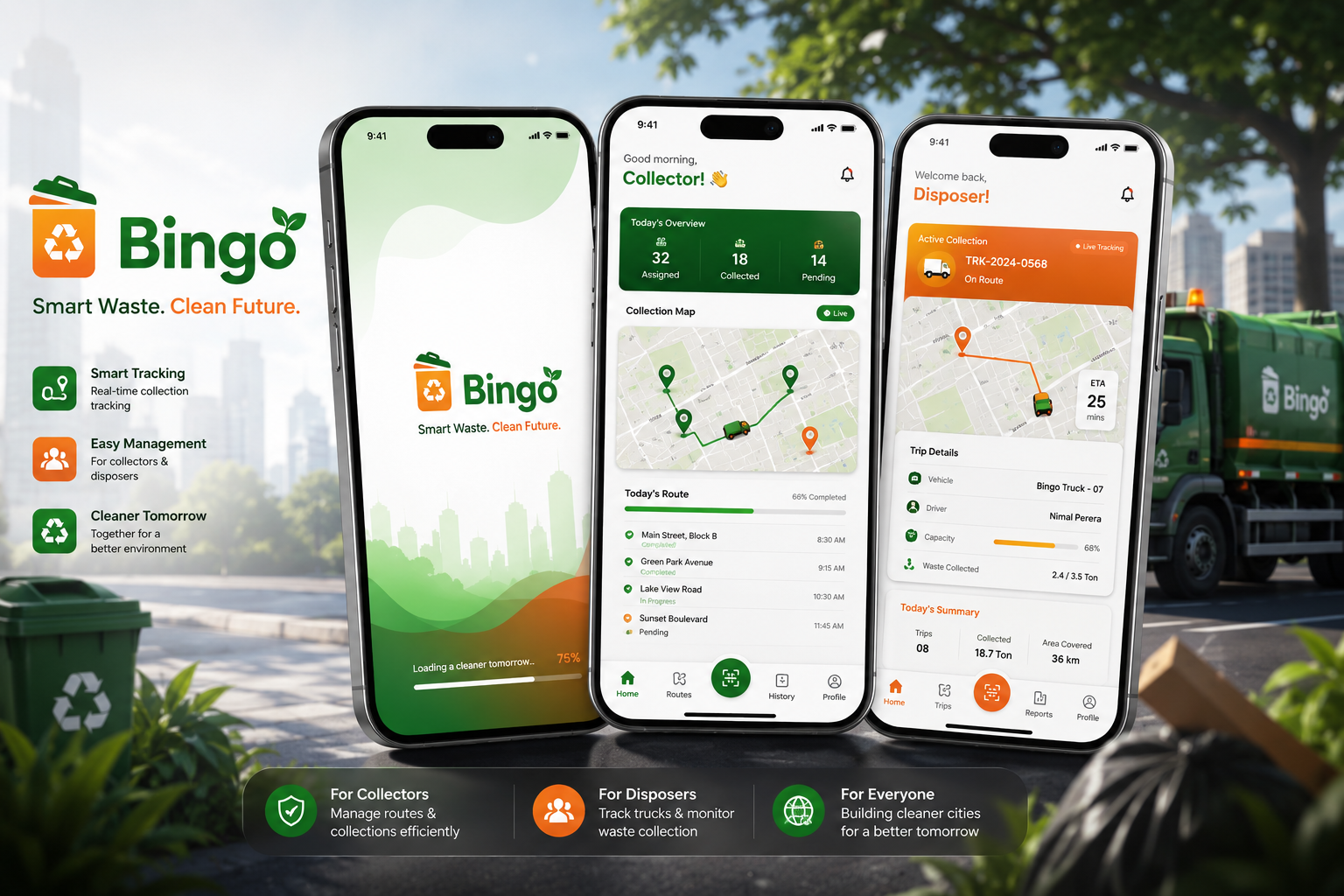
Today's overview — assigned, collected, pending — a live collection map, and per-stop status designed for gloved, one-tap use.
Less backtracking, fewer disputes — the day closes itself.
Admin Dashboard
Supervisors track 12 trucks with a phone and paper.
Fleet GPS, completion by ward, complaint queue with SLAs, daily tonnage, and route optimization that pays for the subscription in fuel savings.
The council sees the service live for the first time — and answers citizens with data.
- Generated edge-case UI states
- Drafted microcopy in three languages
- Produced asset variations
- Designed the final UI & interactions
- Annotated and specced every screen
- Directed the visual language
The full design, in motion:
Built To Scale Across Three Surfaces
Type scales for glanceability — big numerals for ETAs and counts, generous hit targets (min 44px) for gloved and one-handed use, and a component library shared across citizen, driver, and admin surfaces: status chips, route cards, map overlays, and trilingual text styles with Sinhala and Tamil line-height tuning. Color contrast meets WCAG AA on every status pairing.
What This Project Taught Me
Lessons learned: service design beats screen design — the hardest problems lived between stakeholders, not inside the app; validating assumptions early killed two features that felt obvious and saved months; and designing trilingually from day one shaped the layout system far more than any visual choice.
Future roadmap: AI route optimization, IoT smart bins, predictive scheduling, carbon analytics, and recycling rewards — each one building on the data loop the MVP creates.